Image swatches
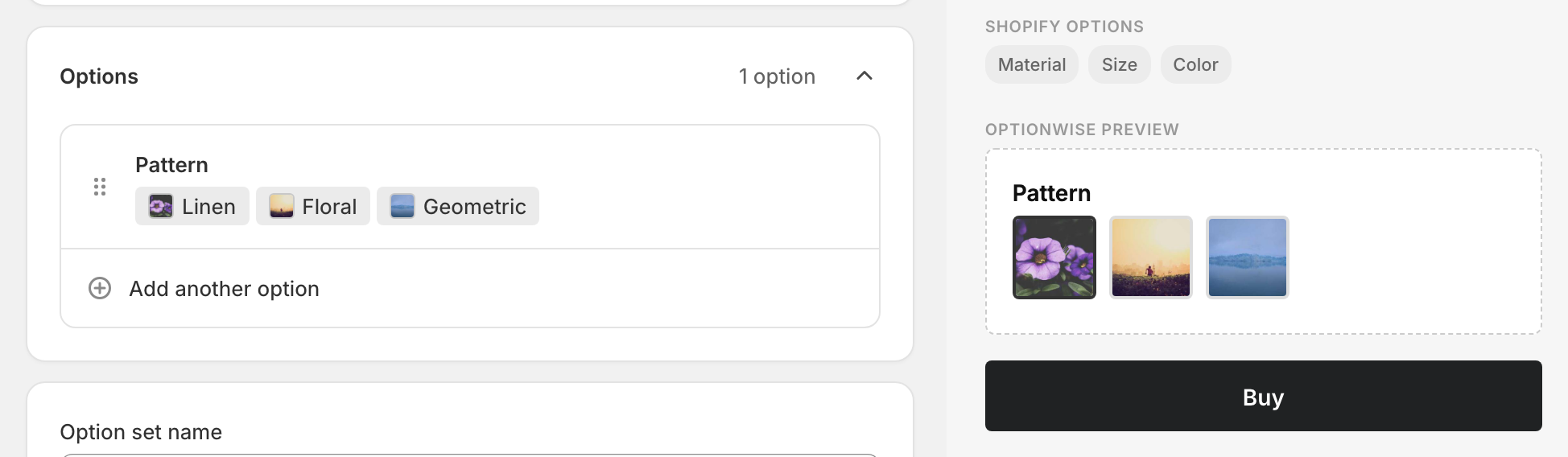
Shows each value as an image thumbnail the customer taps to select. Use it when the choice is visual but a flat color won’t communicate it — fabric textures, patterns, prints, or photos of finished variants. By default the customer picks one, but you can allow several.
If the choice is a plain solid color, color swatches are simpler — you pick the color from a color picker instead of uploading an image.
When to use it
- The choice is a texture, pattern, or print that a solid color can’t show.
- You have product photos of each variant worth previewing.
- The visual difference between values matters to the buying decision.
Add an image swatch option
- In your option set, click Add option.
- Set Type to Image swatches.
- Enter an Option name (“Frame”, “Pattern”).
- Under Option values, click the square beside each value to choose its image, and type the value’s name in the field next to it. Click Add image to add another value.
- Done, then Save.
Give each value a descriptive name. The name is what appears on the order and what screen-reader users hear — “Pattern: Herringbone” is meaningful where a bare thumbnail is not.
Picking one or several
By default, only one swatch can be active at a time. To let customers pick several, open the option’s advanced settings → Validation, and raise Maximum selections above 1 (or leave blank for “no limit”).
Advanced settings
- Default — in single-select mode the first swatch is preselected. Pick a different one under Select a default value, or choose None.
- Validation — allow multiple picks with Maximum selections, ask for at least that many with Minimum selections, and use Required to force a choice.
- Pricing — charge more for a premium material. See Add-on prices.
- Visibility — show the swatches only for certain earlier choices. See Conditional logic.
What customers see
A row of image thumbnails next to your label. The selected thumbnail shows a ring outline. The chosen value’s name is added to the cart as a line-item property.
Swatch size, shape, and whether each name shows under its swatch are set for your whole store on the Appearance page, under Swatches. See Appearance.
Tips
- Use consistent thumbnail dimensions. Mismatched aspect ratios make the row look ragged. Square crops work best.
- Keep the row short. More than ~8 thumbnails wraps awkwardly on mobile.
Related
- Color swatches — for flat solid colors
- Buttons — text choices, can allow multiple picks
- Add-on prices — charge more for premium materials