Conditional logic examples
A few common patterns, each built from the visibility rules covered in setup. In every case the rule goes on the option you want to reveal, and points at the option that controls it.
Gift wrap reveals a message field
Show a gift-message box only when the customer opts into gift wrapping.
Build the controller
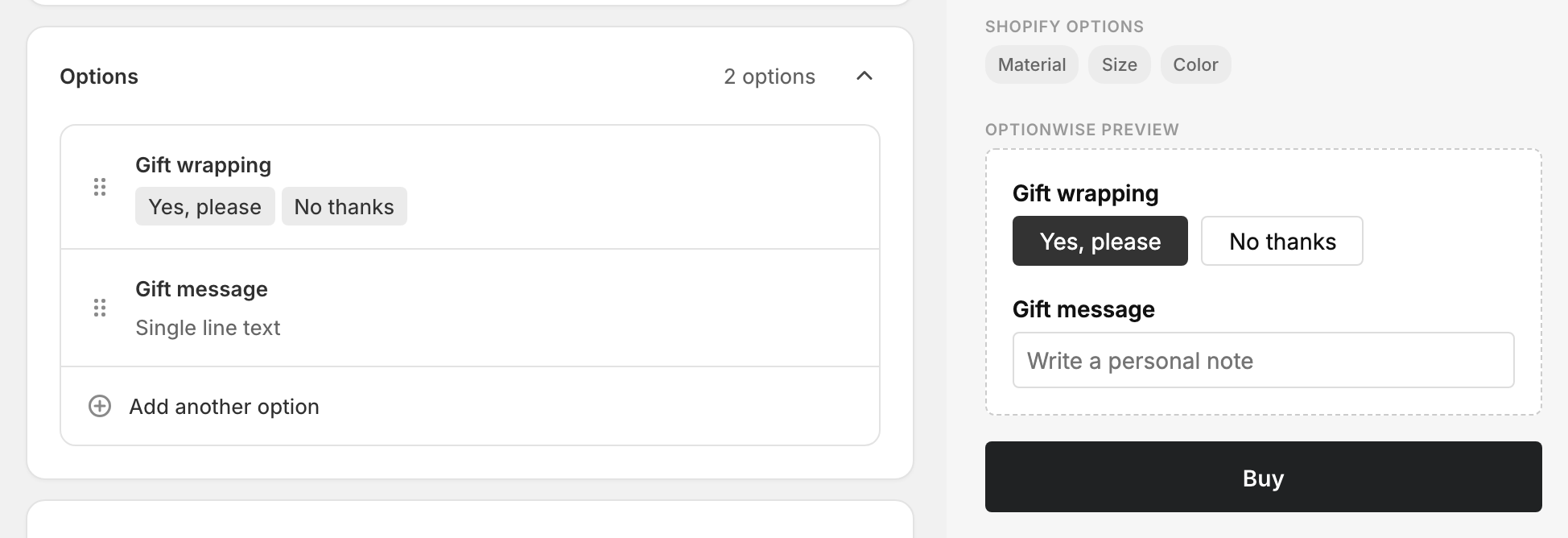
Add a Buttons option named “Gift wrapping” with two values, “Yes, please” and “No thanks”.
Build the revealed option
Add a Text option named “Gift message”.
Add the rule
On the Gift message option, open Visibility → Only visible when… and set Gift wrapping is set to Yes, please. Save.
Now the message box appears only after the customer opts into gift wrapping — here the live preview shows the revealed field once “Yes, please” is selected:
Engraving toggle reveals font and text
Reveal both a font picker and an engraving field when engraving is turned on.
Controller
Add a Checkboxes option “Add engraving” with one value “Yes”.
Revealed options
Add a Dropdown “Font” (with your font values) and a Text “Engraving text”.
Rules
Put the same rule on both the Font and the Engraving text options: Add engraving is set to Yes. Save.
Both options reveal together when the customer enables engraving.
Material choice reveals different finishes
Show a different set of finishes depending on the material the customer chose.
Controller
Add a Buttons option “Material” with values “Wood” and “Metal”.
Revealed options
Add a Color swatches option “Wood finish” (stains) and another “Metal finish” (powder-coat colors).
Rules
On Wood finish, set the rule Material is set to Wood. On Metal finish, set Material is set to Metal. Save.
Each finish picker appears only for its material.
Reveal only when several conditions hold
Conditions on different options are required together — for example, show a “Rush production note” field only when the customer picked both Express shipping and ticked Custom artwork. Add one condition for each option; because they point at different options, both must hold. See multiple conditions.
If a revealed option is also a required field, remember it’s only enforced while it’s visible — a customer who never triggers the rule won’t be blocked by it. That’s usually what you want.